A managed event bus for apps, webhooks and AI agents

Get the first event all the way through.

You do not need to read every document first. Pick an integration path, verify publishing and receiving, then come back for quotas and delivery semantics. Start with MCP, JavaScript, TypeScript, Python or curl.

Your first publish takes about five minutes · Free with no credit card

Into your existing system · 5 min

Integration examples, ready when you need them.

Use MCP for an agent subscription, an SDK for an application, or curl to verify the HTTP path. Snippets come from the platform at runtime. No existing system yet? Run an official example instead.

No key yet? Sign up, create one on the panel's Keys page, and set it as MQ_API_KEY. To publish and subscribe with the same key, choose the custom key scope and enable publish and subscribe. MCP also needs a key. Use an admin key when you want an agent to create topics or issue narrower keys for downstream services.

What you can build

Start with the event path closest to your product.

Each use case names its delivery path and limits, so you can judge the fit before you build.

01 / AI-NATIVE

AI agents subscribe to events and react

An event wakes a long-running agent the moment it arrives, instead of polling every few minutes long-lived subscription event agent polling, for comparison empty-handed

Paste the config into Claude Desktop or Cursor. Your agent can then wait for events through MCP's watch_topic and act when an order or alert arrives, without another polling service in the middle.

Why MsgMesh: agents connect through MCP, so you do not need a separate event bridge.

02 / REALTIME

Realtime chat / multiplayer collaboration

A message published to a room only reaches subscribers of that room; other rooms do not receive it publish room: vip room: main presence

Chat, co-editing, and live interactions can receive messages in real time. Use room to separate groups within one topic; publishing and SSE or WebSocket subscriptions can both target a room. Browsers receive short-lived tokens while long-lived keys stay on your backend.

Why MsgMesh: the platform handles room routing and short-lived credentials, while the official SDKs handle reconnects and deduplication. presence is currently aggregated per topic, not per room.

03 / WEBHOOK

App event notifications / webhook relay

Events that fail to reach a webhook are retried automatically; once retries are exhausted they land in a dead-letter queue and can be replayed event webhook dead-letter replay ✗ ×3

Deliver notifications from system A to system B with at-least-once semantics. Failed deliveries retry automatically; exhausted deliveries move to a dead-letter queue where you can inspect and resend them. If you register a webhook secret, each delivery includes X-MsgMesh-Signature for verification.

Why MsgMesh: retries, DLQ handling, and signatures are built in, with no separate queue to operate.

04 / VIBE CODING

Let the agent take over provisioning

An event wakes a long-running agent the moment it arrives, instead of polling every few minutes long-lived subscription event agent polling, for comparison empty-handed

Create an admin key on the panel's Keys page and add it to your MCP config. You can then ask your AI IDE to create an orders topic and a key limited to that topic; the agent calls create_key and create_topic to apply the setup.

Why MsgMesh: topic creation and key issuance also work through MCP, so you do not need to keep switching back to the panel after initial setup.

Plans & pricing

Plans and pricing.

Use Free to validate the integration. Paid is US$19/month when you need higher throughput, 30-day retention and managed functions.

🚧 MsgMesh remains in public beta with no SLA. Free remains free; Paid is US$19/month. We will give advance notice of future plan or beta billing-rule changes.

Free: US$0 with 1M message operations per period, 20 requests/sec, 5 topics, and 3-day retention. Paid: US$19/month with 6M operations per period, 2,000 requests/sec, 1,000 topics, 30-day retention, and managed functions.

Estimate your monthly cost

Start with three everyday numbers. Drag the sliders to explore, or enter exact values when you have them.

Not sure what to enter? Try a common scenario:
100K messages

Count only messages you successfully send, before multiplying by recipients.

10 deliveries each

If one message goes to 10 subscribers, enter 10.

4 KiB

Most JSON notifications are below 16 KiB. Each additional 16 KiB adds one size unit.

Messages you send100,000
Platform deliveries (estimate)1,000,000
Billable usage (operations)1,100,000
Size units per message 1 Usage from sending 100,000 Usage from delivery 1,000,000

With the current plans, your monthly estimate is:

Loading price and included quota from the public plans API…

This is an estimate, not a bill. It assumes every message has the entered size and one plan is used for the whole month. Price and included quota come only from the public GET /v1/plans endpoint. Actual charges use successful publishes and billable deliveries. Overage is off by default and incurs usage charges only after you add balance and explicitly enable it in the panel.

Expand: how are message operations calculated?

The operations a message costs = size units × (one publish + one per delivery). A size unit is every 16 KiB, rounded up, so anything under 16 KiB still counts as one. A delivery is the platform sending it out to one subscriber once: written to an SSE or WebSocket connection, returned by a long-poll fetch, or successfully delivered to a webhook. History queries and management calls are not counted.

Example: a 40 KiB message sent to 3 subscribers is 3 size units × (1 publish + 3 deliveries) = 12 operations.

The included quota is counted per period: it resets on the 1st of each month (UTC), and changing plan opens a new period that day, at most once per calendar month. Message counts and delivery counts are shown separately in the panel, but they are not the billing unit and cannot be converted into one another.
Expand: overage, top-ups, tax and cancellation

Overage is off by default, so usage charges are never automatic. Free and Paid can add prepaid balance and explicitly enable overage in the panel; usage beyond the included quota is US$3 per million operations and settles daily. Top-ups start at US$5. Tax is determined by billing location, and available balance is credited from the net amount after tax collected by Polar, so it may be lower than the payment amount in tax-inclusive locations. Paid can be cancelled at any time and remains active through the current billing period; see the Refund Policy for refund eligibility.

No system needed · runs standalone

Ready-to-run integration examples.

The snippets above are the minimal change to an existing system; these two examples are the opposite — each is a complete project on its own. No app of your own needed: fill in one API key and it runs standalone on your machine. On every commit, CI installs, builds, and actually loads each one in a browser.

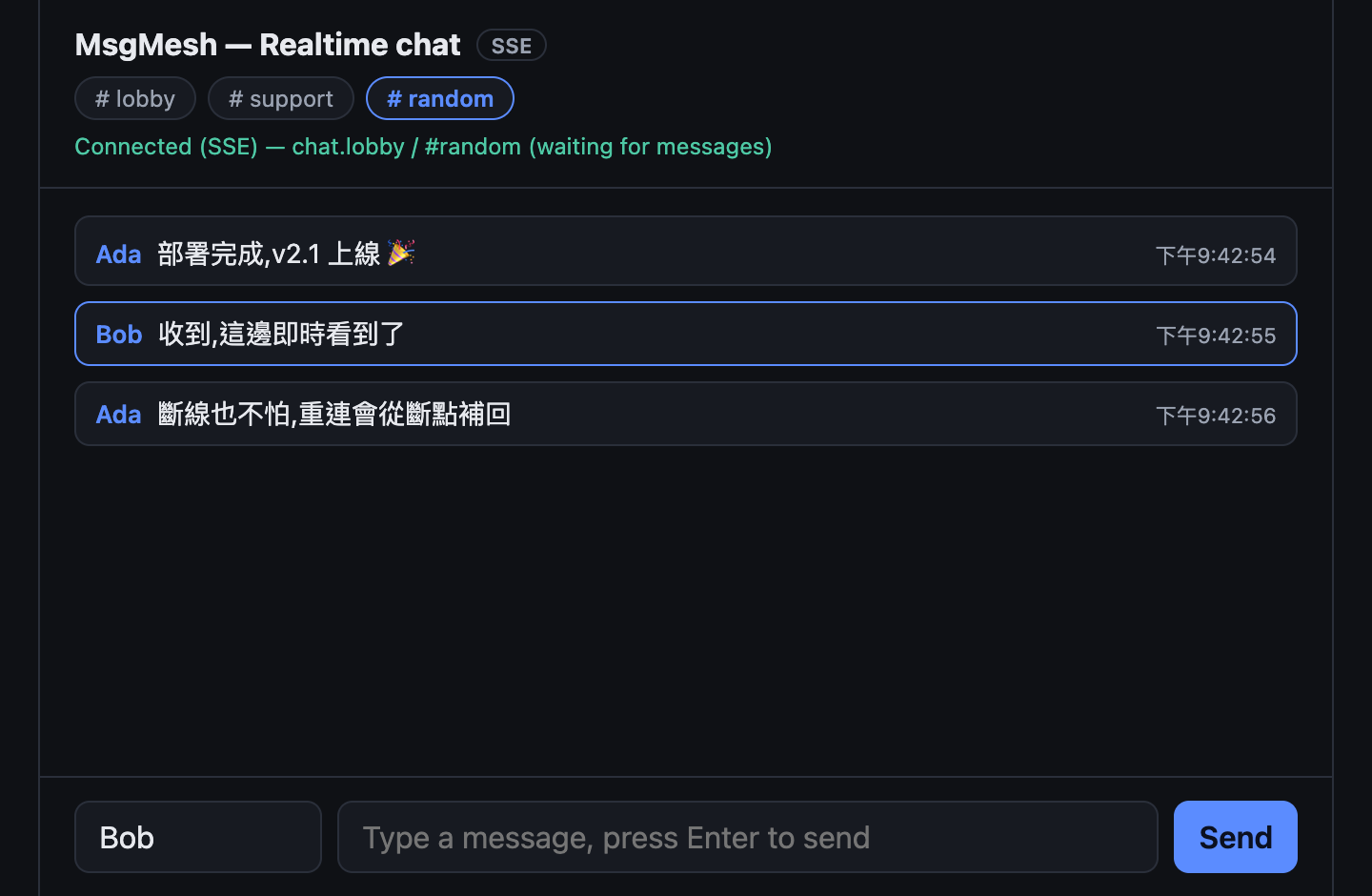
Web chat roomchat-web

No long-lived key in the frontend. The example includes a minimal token-broker: the long-lived key stays on the backend, while the frontend receives a five-minute, scoped-down token. The platform enforces its room list and returns 403 for out-of-scope subscriptions. It also demonstrates SSE receiving, multi-room isolation, and cursor-based recovery after a disconnect.

git clone https://github.com/LukeLogix/msgmesh-examples
cd msgmesh-examples/chat-web
npm install
cp .env.example .env
npm run build
node --env-file=.env server.js
chat-web running: two tabs exchanging messages in the same room in realtime, status bar showing Connected (SSE)

Open two tabs and send messages between them to see realtime delivery. .env needs a key with both publish and subscribe capabilities.

chat-web source ↗

Event watcher scriptagent-notifier

An event watcher for AI agents and backend services. A Node script waits on a topic with subscribe() long-polling and handles each event as it arrives. It reconnects with backoff after a disconnect and stops only when the key is revoked. It consumes the entire topic (firehose) and does not filter by room.

git clone https://github.com/LukeLogix/msgmesh-examples
cd msgmesh-examples/agent-notifier
npm install
cp .env.example .env
npm start

Once running, it prints one line per event. Publish an event with the curl example or chat-web to verify it. The key only needs the subscribe capability, which limits the impact if it is exposed.

agent-notifier source ↗

Send your first event

Free is enough to validate an integration · No credit card

Create a free account →